Manager Self-Service

Tackle priorities efficiently to build teams that last.

or see how it works →
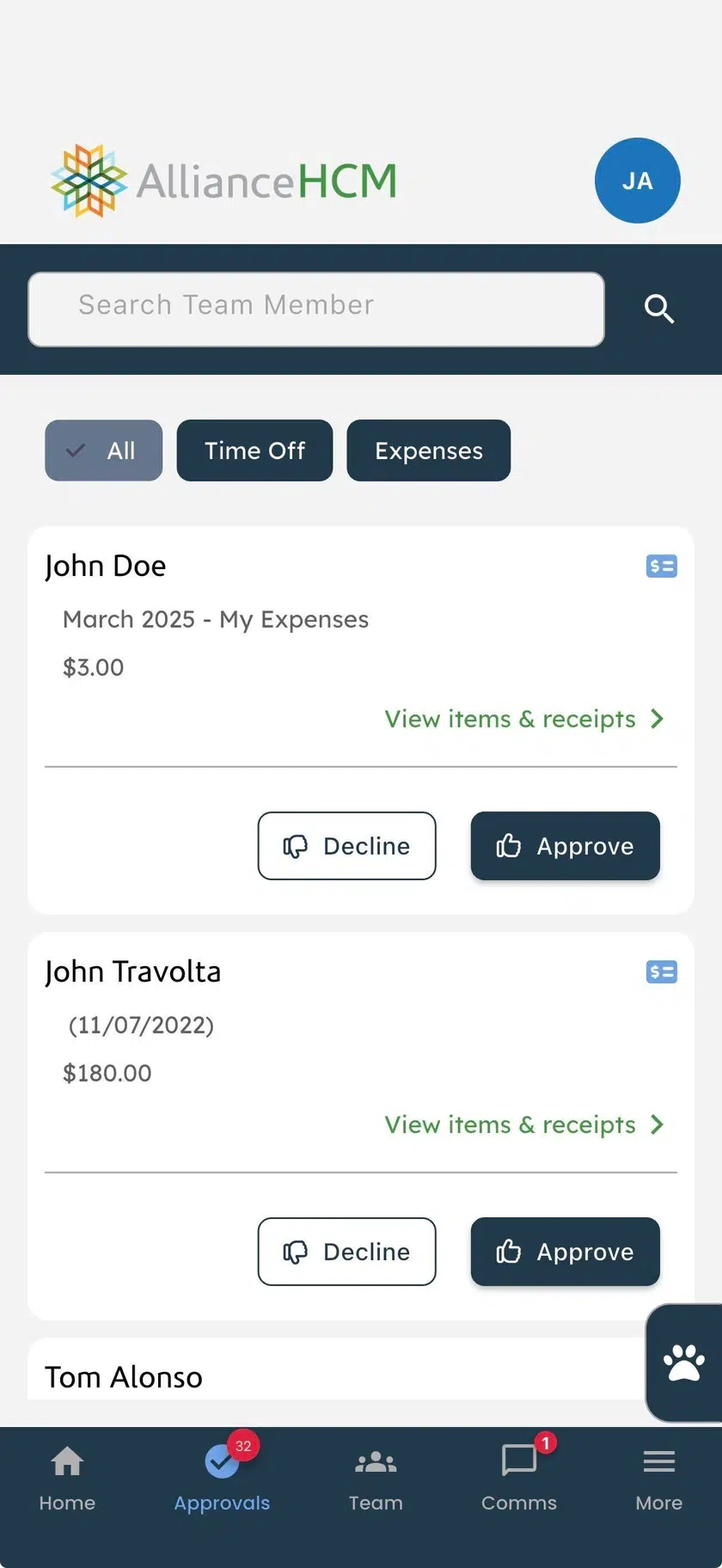
Manager Self-Service on a phone: the Approvals tab with expense requests, each with Decline and Approve
The problem

Your managers are carrying more than anyone can hold

51%more responsibility than a manager can absorb1
22%of managers are engaged at work2

Sources: 1 Gartner, reported in Harvard Business Review, April 2024.  2 Gallup, State of the Global Workplace 2026.

The solution

A mobile-first approach for managers to solve problems as they come

Tackle critical tasks the moment they arise

Spot attrition early with employee insights

Keep teams engaged and informed

1 Approvals

Tackle critical tasks the moment they arise

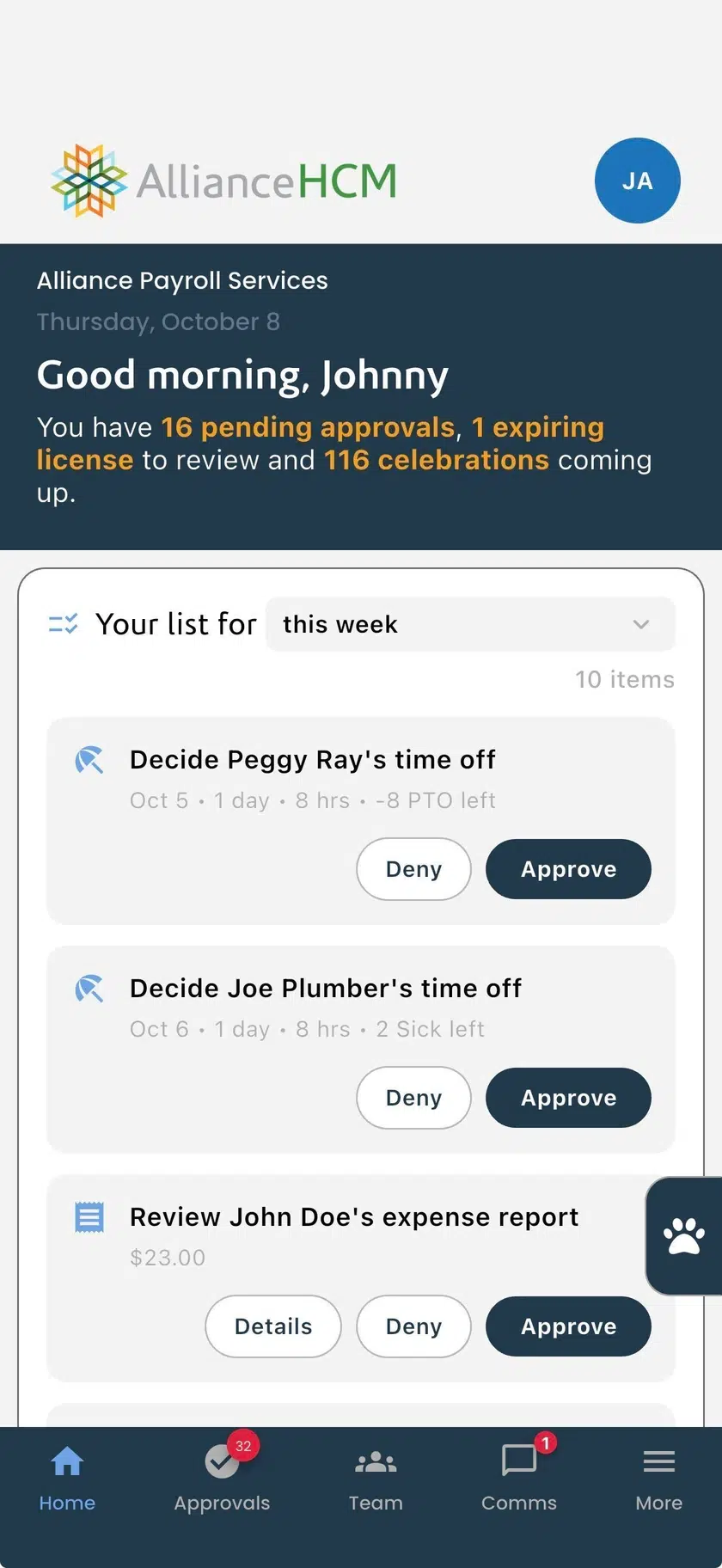
  • Approve time-off and expenses without leaving the floor
  • Have full visibility of your teams calendar
  • Check expense reports easily in one view
Manager Self-Service home screen on a phone: the week's list with time-off and expense requests, each with Deny and Approve
2 Team insights

Spot attrition early with employee insights

  • Stay up to date on turnover and retention
  • Spot retention risks and compliance gaps
  • Catch turnover trends before they materialize
Active Headcount
338
Turnover (12mo)
4.1%
Retention
95.9%
Onboarding
3
starting in 30 days
Unchanged Rates
182
2+ yrs since increase
3 Team communication

Keep teams engaged and informed

  • Send reminders to teams about top-priority items
  • Act on stalled onboarding processes
  • Broadcast critical milestones and achievements
Payroll and HR managers

Customer use case in action

Approve time off and expenses from the feed
Answer who is on today without asking HR
Spend the day on judgment, not lookups
The outcome

Managers who can answer for their own teams.

Decisions happen the moment they come up

No email, no queue, no waiting on a reply.

Risks surface before someone resigns

Turnover, tenure, and stale pay, worst case first.

HR's day goes to judgment, not lookups

And nothing is handed off ungoverned.

I love that there's so much insight in here for our managers.
JacobOperations Manager, Fuel City
Manager Self-Service

Managers who can answer for their own teams.

See it on your own account. Same login your people already use.

Prefer to read first?

FAQ

Frequently asked questions

Managers sign in with the same login they already use as an employee and flip one switch. There is no new app or system to learn. If a manager can use their employee login, they can use Manager Self-Service.

Manager Self-Service grants no new visibility. It surfaces only what a manager's existing permissions already allow, filtered to their own people, and compensation detail stays behind its own separate right. A manager without rights to a section never sees that page, card, tab, or button, and every action is re-checked when it is submitted.

Manager Self-Service uses manager accounts and permissions that already exist, so there is no new rollout, new login, or security review required to turn it on. An Alliance implementation consultant can switch a client's managers into Manager Self-Service using the permissions their accounts already carry.

No. Manager Self-Service is a switch inside the platform your managers and employees already use. There is no separate seat license, login, or implementation to budget for.

The remaining balance shows directly on the time-off tile and turns red before the manager approves, so the risk is visible up front, not discovered afterward.

Compensation detail stays behind its own separate permission, and any section a manager lacks rights to is simply absent rather than shown and disabled. Everything is filtered by the permissions already assigned to the manager's account.

The notification bell is calculated the same way the approval pages calculate their counts, using whatever filter the manager last saved. The number on the bell is the number of rows they land on. Counts refresh on a short cycle and update immediately after a manager approves or denies something.

Site Map